PM Solar Panel Yojana Login 2026
If you have already registered for the PM Surya Ghar Muft Bijli Yojana, you can log in to your account to complete your application, check the status, or apply for the subsidy.
How to Login and Apply
Follow these simple steps to access your account:
Step 1: Visit Official Portal
Go to the official PM Surya Ghar portal.
Step 2: Enter Credentials
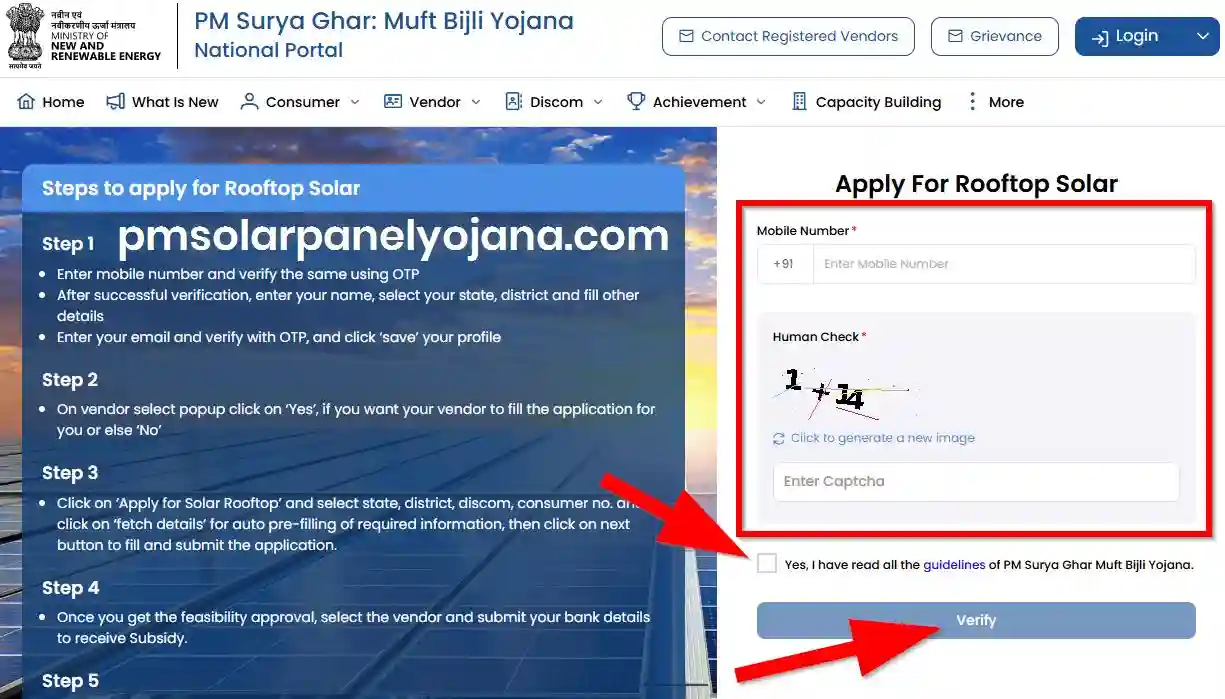
Click on "Apply For Rooftop Solar" and then select the Login Here option. Enter your registered Mobile Number.
Step 3: Verification
Enter the CAPTCHA code and click "Next". You will receive an OTP on your mobile. Enter the OTP to log in.
After Login: Completing Your Application
Once logged in, you will need to fill out the application form with the following details:
- Personal Details: Name, Address, Contact Information.
- Electricity Details: Distribution Company, Consumer Number.
- Solar Details: Proposed Rooftop Solar Capacity (kW).
Click "Save & Next" to submit your application.
What Happens Next?
Feasibility Approval
Your application is sent to your DISCOM for feasibility approval.
Installation
Once approved, proceed with installation via a registered vendor.
Subsidy Release
After inspection and commissioning, the subsidy is transferred to your bank account within 30 days.